
Showing posts with label Firefox. Show all posts
Showing posts with label Firefox. Show all posts
Firefox 3.5.4 Security Update Available for Download

Brain Damaged Browser.
I seriously hate Firefox for only one thing. This –>

I don’t know why a browser needs 1GB of memory and 94% of CPU Usage. But this is seriously sick.
Firefox 3.6 Alpha is Released.
Mozilla has released the first Alpha version of Firefox 3.6, code-named Namoroka. the pre-release version of the browser is available for Windows, Linux, and OS X, and includes a number of new features including:
- Tab previews when you hit Ctrl + Tab
- Faster JavaScript engine
- Improved startup speed and overall responsiveness
- Better session restore features
You can read about them in the release notes. Strangely the tab previews weren't enabled by default. In order to enable them, type "about:config" into the location bar (without quotes) and then search for browser.ctrlTab.previews and set the value to true.
[via Mozilla Links]
Firefox 4 – A sneak preview.
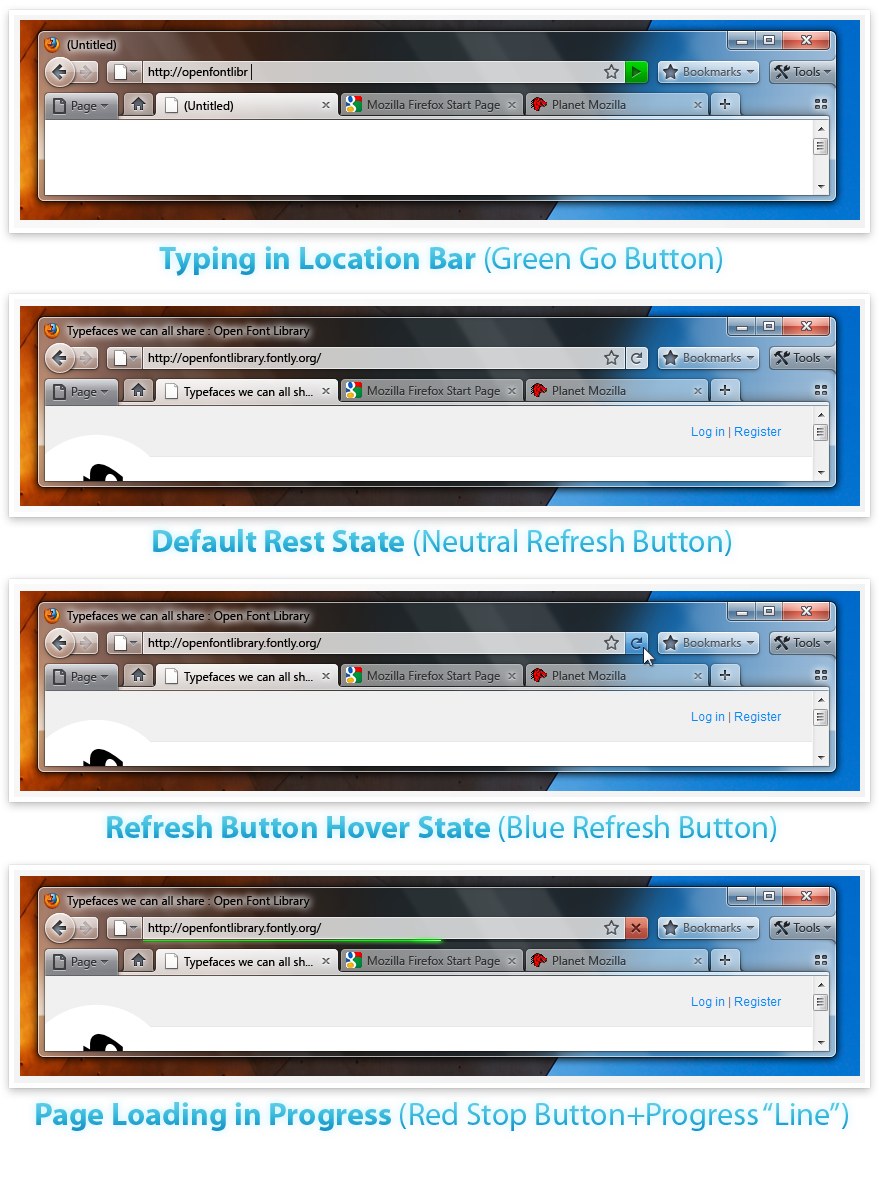
Busy designers at Mozilla are back with some theme mockups for the even-further-into-the-future Firefox 4.0.
Mozilla wants to give you a free MacBook Pro for your killer add-on!
Take the Extend Firefox 3.5 challenge, for example. If you can come up with a creative, innovative, or just plain cool, you could just win yourself a MacBook Pro - or one of several other kick-ass prizes.
Goodbye Firefox 2.
As expected, Mozilla has pulled the plug on Firefox 2. There will be no more security updates, and no more support for the web browser. When users download and install the latest update for Firefox 2, they're greeted with a message suggesting they upgrade to Firefox 3 which is generally both faster and more secure than Firefox 2. 
Of course, some people don't like the way Firefox 3 handles bookmarks or tabs, which could make them reluctant to upgrade. But I'd recommend upgrading for the security enhancements alone. You can always search for Firefox add-ons that enhance the bookmark manager or tab positions.
[via Mashable]
Technorati Tags: Firefox
28 Coolest Firefox About:Config Tricks
Make Tech Easier has a nice list of 28 tweaks for Firefox, for those that just love to  get under the hood and play.
Make Firefox 3 bookmark work with Launchy
 Firefox 3 doesn't store your bookmarks in the plain old HTML file that Firefox 2 did, so desktop launchers like Quicksilver and Launchy can't index them properly. But the HackCollege blog has a solution: a Firefox 3
about:config tweak that makes Firefox automatically export your bookmarks to a file. Change the browser.bookmarks.autoExportHTML value from false to true to get a bookmarks.html file saved to your Firefox profile directory each time you shut down your browser.
Indexing Firefox 3.0 Bookmarks with Quicksilver [HackCollege]
Weave 0.2 ready to sync you up !
Mozilla Labs has released Weave Prototype 0.2. Weave is Mozilla’s answer to the problem of keeping all your bookmarks, history, passwords and more in sync across multiple computers.

So what is new in this 0.2 version of Weave?
- Intelligent scheduler for synchronization to improve performance.
- Expanded set of supported browser settings and metadata, including: Bookmarks, Browsing History, Cookies, Saved Passwords, Saved Form Data, and Tabs.
- Support for retrying failed network operations.
- New server format performs better when there are frequent changes (e.g., for history sync).
- Significant reworking of the startup experience, including a new Setup Wizard that performs account creation in chrome and allows for customization of settings.
- Improved error detection and handling.
- Notification dialog added to the status bar for displaying error, status and asynchronous events with or without required actions, e.g. authentication errors, notification of shares, etc.
Might be worth mentioning that they are still saying this version is for testing purposes only, so if Firefox later on kicks you in the head, points its browsing finger and laughs while your down, you were warned.
Ready to test it out? Then download Weave 0.2 here!
Technorati Tags: Firefox, bookmarks, weave, mozillaPDF Download 2.0 Beta Adds Advanced Web-to-PDF Conversion
The makers of the PDF Download extension have released a 2.0 beta that adds some key features, including a full web-to-PDF converter that re
Firefox Guinness World Record Official
Mozilla officially announced today that Firefox 3 set the Guinness World Record for most software downloads in 24 hours, totaling at an impressive 8,002,530 downloads.
Technorati Tags: Firefox 3
Technorati Tags: Firefox 3
Frefox 3: Enable Spell Check in Text Boxes (not just textarea fields)
By default, Firefox 3 will spell check textarea fields (the memo or multiline text fields), but it doesn't check regular text boxes (the single lined variety). Here's how to enable spell check on both the single and multilined text boxes.
1. Open Firefox 3.
2. In the Location Bar, input about:config.
3. Click to get past the warning message that appears.
4. Locate the Preference Name layout.spellcheckDefault.
5. Double-click it and change the value to 2.
Keep your Firefox user data synced with Weave
With the unexpected news that Google was dropping its Browser Sync Firefox addon, attention is now turning to Mozilla Labs’ “Weave” project.
Weave is also a Firefox add-on and its purpose is to allow you to backup your Firefox settings such as your bookmarks, history, passwords, customizations and preferences and then sync them with the Mozilla servers so that you can access them from anywhere that allows you to access the internet. Obviously this data is encrypted so that it’s securely stored. Weave is still a beta experimental project so you have to decide if you want to risk your Firefox user information in testing this. If you decide you fancy taking a walk on the wild side then go to the Weave homepage and create an account.
Technorati Tags: Firefox, Mozilla, Google
Google Tosses Browser Sync in the Trash
According to Lifehacker, google's browser sync extension will be discontinued. It will continue to be supported for Firefox 2 through 2008 but there are no plans to bring it over to Firefox 3.
For those of you who want to continue to use Firefox 2, we’ll maintain support for old versions of Google Browser Sync through 2008. After that, we can recommend a few other products that scratch a similar itch. We hope that one of them works for you:
Mozilla Weave [labs.mozilla.com] from Mozilla Labs—Offers bookmark and history synchronization across computers.
Google Toolbar for Firefox [toolbar.google.com]—Store your bookmarks online and access them from any computer online.
Foxmarks Bookmark Synchronizer [addons.mozilla.org]—Synchronizes your bookmarks across all computers where it is installed.
Here is some more coverage:
- Google Browser Sync To Be Discontinued
- Google Ditches Browser Sync Extension for Firefox 3
- Google discontinues Google Browser Sync
Firefox 3: Use the XP Theme on Vista or Vise Versa
Want to use Firefox 3’s Vista theme on Windows XP or use Windows XP’s theme for Firefox 3 on Vista?
Now you have the choice to switch between these without having to change your computer’s operating system. Two new theme solutions for either XP or Vista have
Download the Firefox 3 themes here:
So if you use XP but you like Vista’s theme more - use it. If you use Vista and like XP’s theme more, you have a more colorful default theme solution.
Firefox 3 field guide.
Mozilla tech writer Deb Richardson offers a thorough rundown of the browser's features  in a Field Guide to Firefox 3.
Technorati Tags: Firefox 3
Firefox 3 will be released on June 17th.
Mozilla announces that Firefox 3 will be officially released this coming Tuesday, June 17th. Get your clickers ready, because they're aiming to break a world downloading record that day.
Technorati Tags: Firefox 3
Mozilla launches Firefox 3 RC2
Firefox 3 RC2 is now available for download. There was a file labeled Firefox 3 RC2 available on the Mozilla FTP server for the last few days. But until Mozilla updates the links on the download page, it's not official.
So what's new with Firefox 3 RC2? Not a whole heck of a lot that you'll notice. This release wasn't about adding new features, but rather fixing bugs. There's still a rather lengthy list of known issues which you can read about in the release notes.
Also, keep in mind that installing Firefox 3 RC 2 will overwrite your previous Firefox installation. You shouldn't lose any bookmarks or preferences, but some add-ons may stop working until the developers update those extensions.
All about “about”
Here are all of the useful (and not so useful, but still funny) about: triggers you can type into your address bar.
about: — The same page as “Help -> About”.
about:blank — A blank page. Useful for setting as your homepage.
about:cache — Displays cache statistics and disk cache directory location.
about:config — GUI for modifying user preferences.
about:crashes — List of Breakpad crash reports, with links and datestamps. Only in products based on Gecko 1.9 or later (Firefox 3, Thunderbird 3, SeaMonkey 2).
about:credits — The list of contributors to the Mozilla projects.
about:logo — Displays the application logo (Mozilla Suite, SeaMonkey, and Firefox 3).
about:kitchensink — Was never included in Mozilla for the reasons listed in Bug 122411 (”Mozilla does not have a kitchen sink”). You can install an extension that adds it though :)
about:license — shows the Mozilla Public License and the Netscape Public License for the piece of software. ( Only in products based on Gecko 1.8 or later)
about:mozilla — The famous Book of Mozilla.
about:plugins — Lists all your plugins as well as other useful information.
about:robots — Easter egg, see bug 417302. Beginning with March 8th, 2008 trunk builds, it’s now available on Firefox 3.0b5.
List is courtesy of Mozillazine. From the useful to the silly, which of these is your favorite?
How to revert to the “old” Google favicon
Google recently changed their favicon from the ever familiar boxed G, to a smaller g. If you’re not a big fan of the new icon, you can install this Greasemonkey script and pretend the change never happened. You will of course need to be using Firefox as your browser to use Greasemonkey scripts.

Subscribe to:
Posts (Atom)