Showing posts with label google. Show all posts

Google Music Search Officially Launched

Today Google is officially launching built-in music playback results on regular Google search queries.

Much has been made of this new feature, and it certainly will make it easier for users to get straight to a song they're looking for, but it's not something we're getting all that excited about. We'll admit that finding and playing back a song when all you've done is search for lyrics is kind of cool. Still, Google already puts video results from YouTube in the search results page, and more often than not they're what you're looking for, anyway.

Right now we're not seeing the updates in our results, but chances are you'll start seeing them in the next day or so if you aren't already.

Making search more musical [Official Google Blog]

Google Wave opens to 100,000 users today

googlewavebeta100000 According to the official Google blog, 100,000 invitations to Google's most hotly-anticipated new service, Google Wave, are going out today. Wave is being touted as a communication tool that reimagines the way email should work. So, who's getting invited to use this next-generation communication tool? Well, it helps if you signed up early for an invitation and wrote the Wave team a message offering to give feedback. If you're a developer who's been using the developer preview of Wave, you might also get an invitation, and some are going out to paying customers of Google Apps.
In their blog post, the Google Wave folks stress that - if you do land an invitation - you're not going to be playing with a finished product. Wave is still missing some crucial features, and bugs are going to be par for the course until the team starts using the feedback from these 100,000 new users to start identifying problems. Unfortunately, you won't be able to directly invite friends to Wave, but you will be able to nominate them for invitations.
Do you have a Wave invitation yet? What do you think of the service so far?

Picasa 3.5 Organizes Your Photos with Facial Recognition

Google's free desktop photo organizer added face recognition and sync with Picasa Web Albums.

The new Picasa 3.5 contains a facial recognition feature similar to the one already present on Picasa Web Albums, but letting it run over your likely vast collection of assorted photos stashed on your hard drive is a lot more convenient. Picasa creates a new sidebar menu list of "People," and asks you to name the folks it finds in its main "Scanning" menu. If you're signed into Web Albums with a Google account stuffed with contacts, that's pretty easy, actually—just start typing a name, then select the contact that pops up as you type.

You'll probably have to leave Picasa running a long time to get through everything—after 20 minutes, it's about 9 percent through with 13.8GB of photos on my laptop. As you might guess, some of the facial matching is hit and miss, but you get to approve any of the picks Picasa isn't absolutely sure of, and if someone's in your photo library who you don't want to take the time to tag, you can send them to the "Ignored People" pile. All this is in service of a better search function, so you can more easily find photos of yourself and your spouse, your spouse and her friend, or any combination of people, dates, or other search parameters.

Here's Google's video demonstration of how name tagging works in Picasa 3.5:

As noted in the video, the other additions to Picasa 3.5 are a tool to use integrated Google Maps pickers to geo-tag photos, and an option to import photos from a camera card onto Picasa Web Albums directly. Neat features, but kind of underwhelming paired with something like facial recognition, no?

Read up on Picasa's name tag features, grab it at the link, and tell us how well facial recognition is working, or not, with your own photos in the comments.

Picasa 3.5, now with name tags and more [Official Google Blog]

Create your own GMail themes.

First we had GMail themes. Now Google allows you to make Gmail as ugly or pretty as you want – by choosing your own colors.

Go to Gmail -> Settings -> Themes, and click “Choose your own colors”. This opens a window where you can configure a template with instant preview. Hit Save & Close, and Gmail will appear in your custom colors.

Clipboard01

Technorati Tags: ,

UnChrome Anonymizes Your Google Chrome Installation

UnChrome helps you browse anonymously by removing the unique ID from Google Chrome that Google associates with your Chrome installation.  Chrome Privacy Guard does a similar thing.

UnChrome [via Download Squad]

Technorati Tags: , ,

Picasa 3.1 update

Google has released a new official update in the form of Picasa 3.1. The biggest news in this release is that Picasa 3.1 adds support for 38 languages and name tags.

Technorati Tags: , , ,

Picasa 3.1 update

Google has released a new official update in the form of Picasa 3.1. The biggest news in this release is that Picasa 3.1 adds support for 38 languages and name tags.

Technorati Tags: , , ,

Skin Google Chrome.

We love Google Chrome. But quite frankly, the blue theme sucks on my black theme. If you've seen the screenshots of Google Chrome on XP vs Vista, you've probably noticed that the interface looks completely different. If you want to make your XP version use a slick black theme, you can do so with a custom hack.

image

Installing the Custom Theme

You'll first need to download the patched theme file from the link at the bottom. Next, open up an explorer window, and paste in the following to the address bar:

%userprofile%\Local Settings\Application Data\Google\Chrome\Application\0.2.149.27\Themes

You should see a file called default.dll, which you want to make a copy of before you do anything else.

Next you'll want to paste the default.dll contained in the theme's zip file into this directory. You should be prompted to overwrite the current file (which you should have backed up).

image

At this point, you can start up chrome and you'll see the new theme.

Removing the Theme

Simply delete the new default.dll file and rename the copy back to the original defualt.dll name. That's all there is to it. You should note that these themes will have to be re-patched every time a new version of Google Chrome is released, which could be quite often.

Download ZOMBRE Google Chrome theme from deviantart.com

Technorati Tags:

Retrieve Files from Google Page Creator

Google Page Creator, the website creation tool aimed at non-coders, is targeted for closure by Google. The Google Operating System blog offers a handy JavaScript tool and tutorial to help Page Creator users grab their uploaded files and HTML pages for exporting to another service or personal backup. It requires having a multi-link downloading tool, such as DownThemAll and a small bit of HTML tweaking, but if you're not planning to transition your files to Google Sites, it's a helpful post.

Export Files from Google Page Creator [Google Operating System]

iGoogle integrates most Google services.

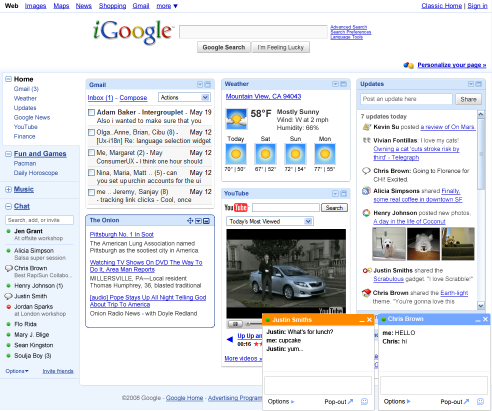
igooglelogo Its always a pleasure to see all heavily used services are integrated and can be invoked from one place. iGoogle has just integrated GMail, GChat and Google Reader into one.

To preview the new iGoogle simply head to the iGoogle homepage and paste the following in the address bar:

javascript:_dlsetp('v2=1');

To revert back to the previous iGoogle simply paste the following:

javascript:_dlsetp('v2=0');

Swastika Appears On Google Trends


A number of people noticed a swastika (卐) on the hot trends list of Google Trends this morning.


Google took the site down with a message that it was undergoing
network maintenance and should be available again in a few hours. Then,
minutes later, the site was back up, with the swastika still listed as
the thirteenth hottest search term.


Google Trends says the query peaked at about 6 am Pacific. The query
is actually a Chinese character, but the trends list that it shows up
for is U.S. searches. It looks like a successful spamming attempt, but
given the number of queries Google handles it looks to be pretty
sophisticated - at one point it was the number one query. We’ve pinged Google for a comment.


Update: It’s now been removed or has fallen off the hot trends list.


Google Launches Lively In-Browser Virtual World

livelylogo.gifThe newest addition to Google Labs is a "3D virtual experience" called Lively, a Windows-only browser plug-in that lets you create and join customized virtual "rooms" in-browser to chat with your friends and associates. You can embed those rooms onto your web site as well. Not at all productivity-related, but a fun new way to interact online somewhere less boring than a text-based forum.


Technorati Tags:

iGoogle Gets a New Look

Google will start rolling out the new version of iGoogle this month, with a full roll-out in July, integrating chat like Gmail, a sidebar, and several other features worth a look. [via]

Chat on iGoogle

Technorati Tags:

Keep your Firefox user data synced with Weave

With the unexpected news that Google was dropping its Browser Sync Firefox addon, attention is now turning to Mozilla Labs’ “Weave” project.
Weave is also a Firefox add-on and its purpose is to allow you to backup your Firefox settings such as your bookmarks, history, passwords, customizations and preferences and then sync them with the Mozilla servers so that you can access them from anywhere that allows you to access the internet. Obviously this data is encrypted so that it’s securely stored. Weave is still a beta experimental project so you have to decide if you want to risk your Firefox user information in testing this. If you decide you fancy taking a walk on the wild side then go to the Weave homepage and create an account.
Technorati Tags: , ,

Get a Ninja in Your Google Reader

In Google Reader, hit the Konami Code key sequence: up, up, down, down, left, right, left, right, B, A to get a shrugging ninja in your sidebar [via Google Blogoscoped]

Google Talk Goes Invisible.

Google Talk in Firefox sidebar has finally integrated the Invisible Status a good 3 months after GMail’s Chat. No news for the GTalk Client yet.

How to revert to the “old” Google favicon

Google recently changed their favicon from the ever familiar boxed G, to a smaller g. If you’re not a big fan of the new icon, you can install this Greasemonkey script and pretend the change never happened. You will of course need to be using Firefox as your browser to use Greasemonkey scripts.

Technorati Tags: , ,

GMail available in most Indian languages.

GMail is available in all major languages of India including اردو (Urdu) , मराठी (Marathi), हिन्दी (Hindi), বাংলা (Bangla), ગુજરાતી (Gujarati), (Oriya), தமிழ் (Tamil), తెలుగు (Telugu), ಕನ್ನಡ (Kannada) and മലയാളം (Malayalam).

To switch to a different language in Gmail, go to the Settings tab and selection a different languages from the Gmail display language drop down. Don’t forget to save your changes.

gmail india settings

Technorati Tags: , ,

GMail to get Themes ?

Gmail will get themes – custom layouts to personalize Google’s web mail client. According to the source, the launch of this may happen within the next months. There will be 12 themes to pick from, according to this information, like a black-and-green “terminal” view, as well as a flowery view.

Already, using third-party tools like Greasemonkey or custom user stylesheets, you are able to add skins to Gmail... but officially, you can only toggle Gmail views like mobile, classic HTML, or normal.

Google at this time also uses themes in products like their personalized homepage iGoogle or Google Reader’s shared items page. A Google product manager in relation to iGoogle’s themes once wrote, “for whatever reason adding a beach or a dancing pig or something else makes me feel like it’s my own.” While Google wouldn’t tell me who designed their early iGoogle themes, many signs point in the direction of Meomi – though if that’s the case it’s of course possible that someone else does the theme designs for Gmail.

Technorati Tags: ,

Orkut for India

Some updates for Orkut - the perhaps the most populat social networking site in India.

Digital Inspiration informs that Google has officially launched the Indian edition of Orkut while Thilak discovers themes inside his Orkut account. You may not see them as Orkut themes are not enabled for everyone yet.

The orkut.com site now redirects you to orkut.co.in if you visit this website from India.